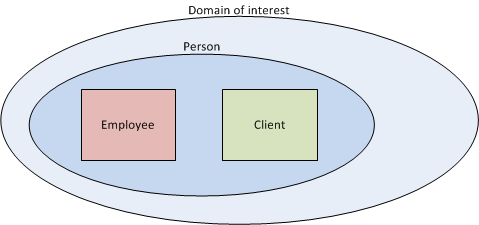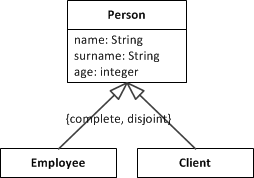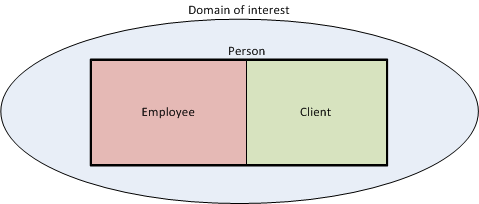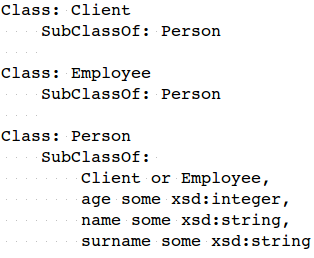
uml2semantics converts UML class diagrams into OWL 2 ontologies, enabling you to reason over your conceptual models and discover inconsistencies or unintended consequences. The UML-to-OWL translation is based on UML to OWL, which provides the related Manchester syntax and SROIQ semantics.
uml2semantics v0.0.3 now supports reading of XMI files. Previously, users had to manually create TSV files to describe their classes and attributes. With XMI support, you can now export your UML class diagram directly from a modelling tool like Enterprise Architect and feed it straight into uml2semantics.
Why does XMI matter? Many organisations already maintain UML class diagrams in modelling tools, such as Sparx Enterprise Architect, representing the core entities of their enterprise data. To make their data Findable, Accessible, Interoperable and Reusable (FAIR), and AI-Ready, being able to describe their data by ontologies, is an essential step.
Getting Started
- Download
uml2semantics.jarfrom the latest release - Requires Java 11+
- Run with your XMI file:
java -jar uml2semantics.jar \
-m "your-model.xml" \
-o "output.rdf" \
-p "prefix:http://your-ontology-iri#" \
-i "http://your-ontology-iri/v1"
See the README for the full CLI parameter reference and additional examples.
Example: Generating OWL from an XMI File
Consider the following UML class diagram, which includes a generalization set with Complete and Overlapping constraints:
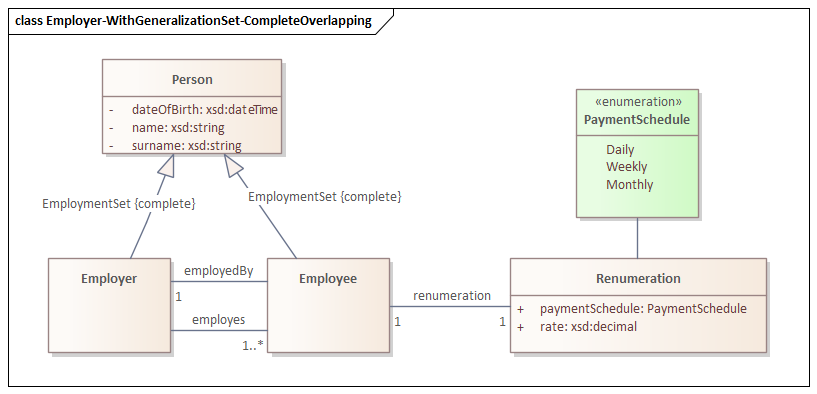
In this diagram, Person is the superclass of Employee and Employer, with a generalization set marked as {complete, overlapping}. This means every Person is at least either an Employee or an Employer (complete), but it is also possible that Person are both (overlapping).
To convert this XMI file to an OWL ontology, run:
java -jar uml2semantics.jar \
-m "./examples/xmi/sparx/Employer-WithGeneralizationSet-CompleteOverlapping.xml" \
-o "./uml2semantics/examples/xmi/sparx/Employer-WithGeneralizationSet-CompleteOverlapping.rdf" \
-p "emp:http://uml2semantics.org/examples/employer#" \
-i "http://uml2semantics.org/examples/employer/v.0.1"
This produces an OWL ontology at the specified output path. Because the generalization set is Complete and Overlapping, uml2semantics generates an owl:equivalentClass axiom stating that Person is equivalent to the union of Employee and Employer.
Example: Combining TSV and XMI with TSV Override
A feature of uml2semantics is the ability to combine XMI and TSV inputs using the --overrides option. This is particularly useful when you want to integrate your UML model with existing linked data vocabularies, such as Schema.org.
For instance, suppose you want the Person class in your ontology to use the Schema.org IRI http://schema.org/Person, instead of the auto-generated http://uml2semantics.org/examples/employer#Person. You can achieve this with a TSV override file for classes:
| Curie | Name | Definition | ParentNames |
| schema:Person | Person |
Similarly, you can map attributes to Schema.org properties. The following TSV override maps the name attribute to schema:givenName and surname to schema:familyName:
| Class | Curie | Name | ClassEnumOrPrivitiveType | MinMultiplicity | MaxMultiplicity | Definition |
| Person | schema:givenName | name | xsd:string | |||
| Person | schema:familyName | surname | xsd:string |
Now run uml2semantics with both the XMI file and the TSV overrides:
java -jar uml2semantics.jar \
-m "./examples/xmi/sparx/Employer-WithGeneralizationSet-CompleteOverlapping.xml" \
-c "./examples/xmi/sparx/Employer - Classes.tsv" \
-a "./examples/xmi/sparx/Employer - Attributes.tsv" \
--overrides TSV \
-o "./uml2semantics/examples/xmi/sparx/Employer-WithGeneralizationSet-CompleteOverlapping-TSVOverride.rdf" \
-p "emp:http://uml2semantics.org/examples/employer#" \
-i "http://uml2semantics.org/examples/employer/v.0.1"
The result: the Person class now has the IRI http://schema.org/Person, and its name and surname attributes use schema:givenName and schema:familyName respectively. The rest of the model — the generalization set, associations, and other classes — comes from the XMI file as before.
This approach is valuable when integrating existing UML class diagrams with linked data. Overrides are not limited to CURIEs — you can add entirely new classes and attributes via TSV that don’t exist in the XMI.
What XMI Features Are Supported
- Classes with attributes — including name, type, and multiplicity
- Generalizations (inheritance) — subclass/superclass relationships
- Generalization sets with all four constraint combinations:
- Complete + Disjoint — translated to
owl:DisjointUnion - Complete + Overlapping — translated to
owl:equivalentClasswithowl:unionOf - Incomplete + Disjoint — translated to
owl:AllDisjointClasses - Incomplete + Overlapping — translated to subclass relationships only
- Complete + Disjoint — translated to
- Associations between classes — translated to OWL object properties
Note: enumerations are not yet supported.
Conclusion
If uml2semantics is of interest to you, please let me know:
- What features will you like to see in this tool?
- If you are using a different modelling tool, it will be very helpful if you can provide an example XMI export and image of your UML class diagram. XMI is supposed to be standard, but as we all know, standards are made to be broken :-).